
Typed functions
Queries and mutations in TypeScript, validated against your schemas. A generated, typed client calls them from React.
feltkit/*.tsWrite your data, queries, and mutations in TypeScript. FeltKit gives you the database, a typed API with live queries, roles enforced on the server, eight built-in services, agent access over MCP, a dashboard, and a build you can deploy three ways—already wired together.
npm create feltkit@latest my-app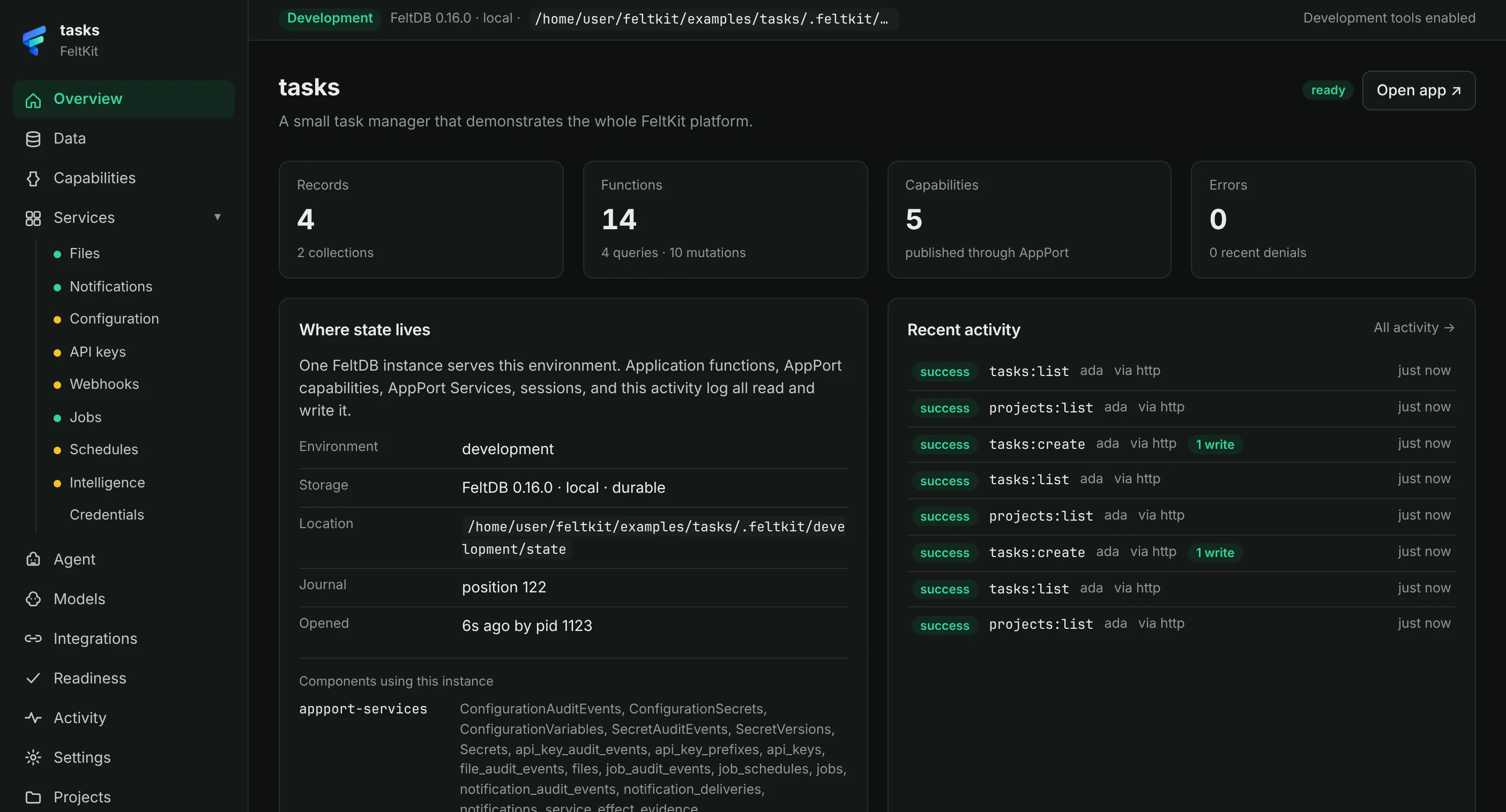
WHAT’S IN A NEW FELTKIT APP
Each piece below is in the starter you get from npm create feltkit—running, tested, and sharing one FeltDB instance. Nothing to assemble, no glue code to maintain.
Queries and mutations in TypeScript, validated against your schemas. A generated, typed client calls them from React.
feltkit/*.tsuseQuery re-runs when data it read changes—whoever changed it: another person, an agent, or a background job.
useQuery · useMutationDeclare roles and permissions once. Every caller—your UI, the HTTP API, AppPort, MCP, services—is checked the same way.
roles: { member: [...] }Files, notifications, configuration, API keys, webhooks, jobs, schedules, and model selection—on your app’s own database.
services: { … }Agents use your app over MCP under a role, like people do. Consequential actions wait for approval—in production, from someone other than who proposed them.
/mcp · /appportA dashboard for data, capabilities, services, models, and activity. In production, operators sign in with one-time grants.
/_feltkit/createTestApp gives every test a fresh FeltDB instance—no mocks. Act as any user and assert what the server allows.
npm testOne container, Managed FeltDB, or your own FeltDB server. The build is verified before it is packaged.
feltkit deployTHE PROGRAMMING MODEL
Declare the application, its roles, and its data. Write queries and mutations. FeltKit serves them over HTTP, keeps React components live, and—when you add a capability—publishes them to agents and other applications.
fail(code, message) returns a structured error your UI and agents can act on.import { feltkit, s } from "@feltdb/feltkit";
export const app = feltkit({
name: "tasks",
// Roles grant permissions. The server checks them on every call.
roles: {
member: ["tasks.*", "files.*"],
viewer: ["tasks.read"],
agent: ["tasks.read", "tasks.complete"],
},
// Built-in services, on this app's own FeltDB instance.
services: { files: true, notifications: true, jobs: true },
});
export const tasks = app.collection("tasks", {
title: s.string({ minLength: 1 }),
done: s.boolean(),
createdAt: s.number(),
});Collections are FeltDB documents. Every write through ctx.db is validated against the schema.
BUILT FOR DEVELOPERS AND AGENTS
Mark a function as a capability and it is published through AppPort and as an MCP tool. Agents call it with a session and a role—through the same authorization, validation, and evidence as everyone else.
Building with a coding agent? npx feltkit skills install gives it FeltKit's own instructions for writing functions, services, and deployments.
Developers remain in control. Agents do more of the work inside clear, inspectable boundaries.
An agent session holds a role. Your capabilities appear to the agent as tools: feltkit session create --type agent.
Every call is authorized by the same policy as a person’s: what the role does not grant, the server refuses.
Consequential actions wait for approval. In production, the proposer cannot approve their own action.
Each call is recorded with who made it, what it asked, and what FeltDB committed—visible in Studio.
An action a crash left open is settled from evidence when the app restarts. It is never run twice.
THE SYSTEM BENEATH FELTKIT
FeltKit uses FeltDB, AppPort, and AppPort Services through their actual package contracts. They remain distinct systems, composed into one application workflow.
 BUILT ONFeltDB
You never configure them separately. Each system keeps its own responsibility while FeltKit connects them for your application—and all three packages are public on npm.
See how the pieces fit together| Layer | Package | What it does in FeltKit |
|---|---|---|
| State | @feltdb/core | The one durable source of truth for each environment. |
| Capabilities | @appport/sdk | Publishes, authorizes, and dispatches capabilities for apps and agents. |
| Services | @appport/services | Eight reusable services—files, notifications, configuration, API keys, webhooks, jobs, schedules, model selection—authorized and evidenced. |
FROM GENERATED CODE TO A WORKING SYSTEM
A working application must satisfy its contracts, use dependencies correctly, preserve state, enforce access rules, and run in its intended environment.
Data, functions, roles, and capabilities in feltkit/.
npm run devState, capabilities, services, and recent activity.
npx feltkit inspectReal functionality, persistence, and access rules—each test on fresh state.
npm testA verified build, packaged for the target you choose.
npx feltkit deployReadiness checks and evidence from what actually ran.
npx feltkit readinessDeploy boots the production build against throwaway state and checks it answers before it writes anything. The same application code moves through every step; deployment selects a target, not a different codebase.
CHOOSE WHERE YOUR APPLICATION RUNS
npx feltkit deploy builds your app, proves the build boots, and writes a ready-to-run artifact: a Dockerfile, docker-compose.yml, fly.toml, an .env.example with exactly the variables it needs, and a DEPLOY.md for the target you chose.
SIMPLEST
The app and its FeltDB state together, state on a volume. Nothing to provision; runs anywhere Docker or Node runs.
--target containerLESS TO OPERATE
A stateless app container, any number of them. Data in Managed FeltDB, created from the contract the build writes.
--target hostedYOUR INFRASTRUCTURE
A stateless app container; data on a FeltDB server you run, in the app’s own namespace, with a key scoped to it.
--target self-hostedA deployment never silently changes where your data lives. The container target refuses a database URL. The other two refuse to start without theirs, and check that the database answers—with this key and this contract—before serving a single request. Each DEPLOY.md spells out the target's secrets, recovery, upgrades, and rollback. (The self-hosted target and these startup checks arrive in FeltKit 0.3.3.)
QUICKSTART
Create a project, install it, and start the development server. You get a real application—not a hello world—with every system already connected through its real contract.
npm create feltkit@latest my-appcd my-appnpm installnpm run dev
Needs Node 20 or later. Then npm test runs the starter's tests against a fresh FeltDB instance, and npx feltkit deploy builds it for production.
FeltKit is pre-1.0 and moving quickly: read the changelog before you upgrade a minor version.